oldgame.cz — old & retro games online free
EN
95 Desktop

Street Fighter

– MS-DOS
Street Fighter
ControlsArrows moveCtrl/Space fireAlt useEnter/Space start/selectEsc menuMS-DOS

1989 · Action · Capcom Co., Ltd. · MS-DOS / PC

Game info_□✕

About Street Fighter

1988. I was sitting at my buddy's place who had a PC XT, watching two pixelated dudes beat each other so slowly on screen that I had time to grab a tea and come back without missing anything. That was Street Fighter by Capcom — and I didn't realize back then that this mediocrity would one day give birth to one of the greatest fighting game series in history.

Street Fighter – screenshot 1

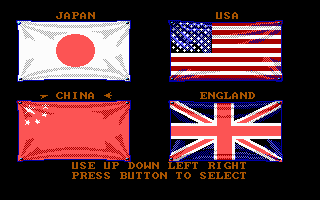
You play as Ryu, a Japanese fighter traveling the world and testing his skills against local opponents. The game gradually takes you through several countries — Japan, USA, China, and England are among the stops — with a pair of opponents waiting for you in each, culminating in a tougher boss. The goal is simple: beat them all. The story essentially ends there.

And that's where the problems start. The controls on the PC version are clunky in a way that goes beyond normal standards for the time. Special moves like Hadouken or Shoryuken theoretically exist, but pulling them off reliably on a keyboard is about as easy as tying your shoelaces while wearing boxing gloves. Hit detection feels erratic — sometimes you land, sometimes you don't, and the game has its own opinion about it. The AI opponents swing wildly from stupidity to brutally blocking everything. There's no consistency.

Street Fighter – screenshot 2

Why do we remember this at all? Because Street Fighter II (1991) became a phenomenon and retroactively drew interest to this first installment — which itself made little impression in 1988, even in its arcade form, let alone in the PC port. The MS-DOS version happens to be one of the less successful ports. The Sound Blaster audio was painful, the graphics skimpier than the arcade original. International Karate or the then-popular Yie Ar Kung-Fu played significantly better and smoother. Street Fighter 1 just lacked that spark of engaging combat that its sequel perfected.

Street Fighter – screenshot 3

Today it's primarily a historical artifact. If you're curious about where the whole series began and why the second installment was so revolutionary — playing the first one is actually the best way to understand it. The contrast speaks for itself. You can run it in your browser today without installation and without hassle, which is probably the only comfort this version ever offered. Expect hiccups, expect frustration, and prepare yourself for special moves landing about one out of four times. Historically interesting, gameplay-wise modest — that's Street Fighter from 1988 in a nutshell.

Versions and ports

Street Fighter began as a 1987 Capcom arcade game. The MS-DOS conversion reached North America in May 1989, published by Capcom and developed by Hi Tech Expressions. Hi-Tech later reissued it together with Street Fighter II on the Street Fighter Series CD-ROM. The 1988 versions for ZX Spectrum, Commodore 64, Amstrad CPC, Amiga and Atari ST were made by Tiertex for U.S. Gold, so they are different ports from the DOS one. On PC Engine CD and TurboGrafx-CD the game was released as Fighting Street.

Controls

The arcade cabinet had a joystick and either six buttons (three punch strengths, three kick strengths) or two large pressure-sensitive pads, one for punches and one for kicks. The special moves are joystick motions, and the arcade instruction card never listed them.

Hadoken (fireball)↓ ↘ → + punch
Shoryuken (dragon punch)→ ↓ ↘ + punch
Tatsumaki Senpukyaku (hurricane kick)↓ ↙ ← + kick

The directions assume your fighter faces right. These are the arcade inputs.

How to run it today

You can play it right here in the browser, no download needed. For a local DOS copy, run it in DOSBox and press Alt + Enter to switch between fullscreen and a window.

Where to buy it legally

The DOS port is not sold as a digital download. The 1987 arcade original is included in the Street Fighter 30th Anniversary Collection (Digital Eclipse and Capcom, 2018), which is available on Steam for Windows: Steam. It also covers PlayStation 4, Xbox One and Nintendo Switch.

Videos and guides

Street Fighter FAQ

Can I play Street Fighter online for free?
Yes — you can play Street Fighter right here in your browser for free, with no installation and no plugins, on both desktop and mobile.
Can I download Street Fighter?
Yes, Street Fighter is available to download here — use the Download button on this page.
What platform does Street Fighter run on?
Street Fighter is a MS-DOS / PC game from 1989.
When was Street Fighter released?
Street Fighter was released in 1989.
Who made Street Fighter?
Street Fighter was developed by Capcom Co., Ltd..
What genre is Street Fighter?
Street Fighter falls under: Action.
How do I save my progress in Street Fighter?
Save inside the game itself — via its own menu, or F2/F3. And if you log in (free), your position is also stored in the cloud, so you can continue on another computer or phone.
Is it legal to play Street Fighter online here?
You play it in your browser via an emulator. For how we handle abandonware and copyright, see our "Is it legal?" page.
How do I control Street Fighter?
The controls are in the Controls section on this page. The keyboard is usually all you need — arrow keys to move and Ctrl, Alt or Space for actions.
Can I play Street Fighter on mobile?
Yes — it runs right in your browser on phones and tablets too. Just tap Play, nothing to install.

Comments on Street Fighter

(0)

No comments yet. Be the first!

Gaming platform – MS-DOS / PC_□✕
About the platform 1981–2000

For two decades MS-DOS was the main gaming platform on PCs. Games launched from the command line and used sound cards like Sound Blaster or AdLib. DOS is the home of legends such as Doom, Prince of Persia and Commander Keen.

Maker IBM PC / Microsoft  ·  Years 1981–2000

Here on oldgame.cz you play it right in your browser via the js-dos emulator — no install, no plugins, on desktop and mobile.

Recommended controls
These games are controlled with the keyboard (see the controls table next to the game). A USB joystick/gamepad can make some titles more comfortable, but is not required.

» More about this platform on Wikipedia

Games similar to Street Fighter

_□✕

More Action games

_□✕
» Random
🚪 Classic site