oldgame.cz — old & retro games online free
EN
95 Desktop

Rockstar

– MS-DOS
Rockstar
ControlsEnter/Space start/selectEsc menuMS-DOS

1989 · Strategy · Wizard Games · MS-DOS / PC

Game info_□✕

About Rockstar

Year 1989, with just a few megabytes of free disk space, and I'm spending hours in a text-based rock stardom simulation instead of studying for geography. Rockstar by Wizard Games was exactly the type of game that looked humble but had you hooked before you knew it.

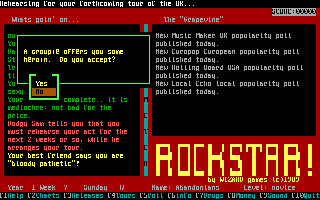
Rockstar – screenshot 1

The goal is to take your band from local gigs all the way to the top of the global charts. You start small, playing in local clubs, gradually working your way up to bigger cities, until you find yourself in America or Europe. Along the way, you write songs, record singles and albums, and decide whether to sign with a major label or stay independent. Every choice has its price and its consequences — that's what made the game engaging.

Gameplay revolves around resource management and decision-making: when to release an album, when to hit the road, how to handle money and popularity. The interface is text-based, keyboard controls, no graphical bells and whistles. The magic was that despite this austerity, you genuinely felt like a band manager watching your group either rise or slowly fall apart because of bad decisions. Throwing a party with fans might seem like a detail, but even these little touches built the atmosphere of a world where fame is a fragile thing.

What aged worst is the lack of clarity and absence of tutorials — in 1989, it was simply expected that you'd read the manual, and if you didn't have it, it took a while to figure out what actually worked and what didn't. Today it requires a bit of patience. On the other hand, this mechanical austerity is also its greatest strength — nothing holds your hand, so every success feels genuinely earned.

Today, Rockstar appeals mainly to those who love management sims from the era before the genre got buried under tutorials and hand-holding indicators. It's a historical artifact — proof that you could tell an engaging game loop with minimal pixels. If you're willing to spend twenty minutes understanding the rules, the reward comes in the form of nostalgic comfort that modern games rarely capture.

Videos and guides

Rockstar FAQ

Can I play Rockstar online for free?
Yes — you can play Rockstar right here in your browser for free, with no installation and no plugins, on both desktop and mobile.
Can I download Rockstar?
Yes, Rockstar is available to download here — use the Download button on this page.
What platform does Rockstar run on?
Rockstar is a MS-DOS / PC game from 1989.
When was Rockstar released?
Rockstar was released in 1989.
Who made Rockstar?
Rockstar was developed by Wizard Games.
What genre is Rockstar?
Rockstar falls under: Strategy.
How do I save my progress in Rockstar?
Save inside the game itself — via its own menu, or F2/F3. And if you log in (free), your position is also stored in the cloud, so you can continue on another computer or phone.
Is it legal to play Rockstar online here?
You play it in your browser via an emulator. For how we handle abandonware and copyright, see our "Is it legal?" page.
How do I control Rockstar?
The controls are in the Controls section on this page. The keyboard is usually all you need — arrow keys to move and Ctrl, Alt or Space for actions.
Can I play Rockstar on mobile?
Yes — it runs right in your browser on phones and tablets too. Just tap Play, nothing to install.

Comments on Rockstar

(0)

No comments yet. Be the first!

Gaming platform – MS-DOS / PC_□✕
About the platform 1981–2000

For two decades MS-DOS was the main gaming platform on PCs. Games launched from the command line and used sound cards like Sound Blaster or AdLib. DOS is the home of legends such as Doom, Prince of Persia and Commander Keen.

Maker IBM PC / Microsoft  ·  Years 1981–2000

Here on oldgame.cz you play it right in your browser via the js-dos emulator — no install, no plugins, on desktop and mobile.

Recommended controls
These games are controlled with the keyboard (see the controls table next to the game). A USB joystick/gamepad can make some titles more comfortable, but is not required.

» More about this platform on Wikipedia

Games similar to Rockstar

_□✕

More Strategy games

_□✕
» Random
🚪 Classic site