oldgame.cz — old & retro games online free
EN
95 Desktop
oldgame.czSimulation

Theme Park

_
Window:
Theme Park
Enter/Space start/select · Esc menu

Default keys for this game (Strategy):

1
2
3
4
5
6
7
8
9
0
Tab
Q
W
E
R
T
Y
U
I
O
P
Caps
A
S
D
F
G
H
J
K
L
Enter
Shift
Z
X
C
V
B
N
M
Ctrl
Alt
space
Alt
move
L
R
Click the game to lock the cursor

Esc = in-game menu · save F2, load F3.

Emulator: DOSBox (js-dos)

Live chat — Theme Park_
live chat chat about this game right now — be nice

No messages yet. Say hi!

1994 · Simulation, Strategy · MS-DOS / PC

Game info_
About the game

You season the fries to sell more lemonade. You place souvenir stalls right past the scariest attraction, because frightened visitors spend better. Theme Park isn't just about building an amusement park — it's about learning how to get money out of people, and having a blast doing it.

Theme Park – screenshot 1

You build and run your own amusement park. You place attractions, draw paths between them, plant trees, build food stalls and shops, and hire staff to keep everything running. Visitors arrive, ride the roller coaster, eat, spend money — and you watch whether they leave happy or annoyed.

Beneath that cheerful surface is a surprisingly deep economic game. You set admission prices and food costs, negotiate supply purchases, manage maintenance so attractions don't start breaking down, and balance spending with income. Every decision has consequences — and a small detail like toilet placement can surprisingly matter a lot.

Theme Park – screenshot 2

What's brilliant is how the game blends the joy of building with humor and life. Visitors have moods, attractions can be tweaked into crazy shapes, and if you neglect something, queues grow and people start complaining. Watching that anthill is entertainment in itself.

Behind the game stands Bullfrog, masters of this genre, who later made Theme Hospital. Theme Park was their pioneering piece, proving that management games could be fun, witty, and addictive all at once.
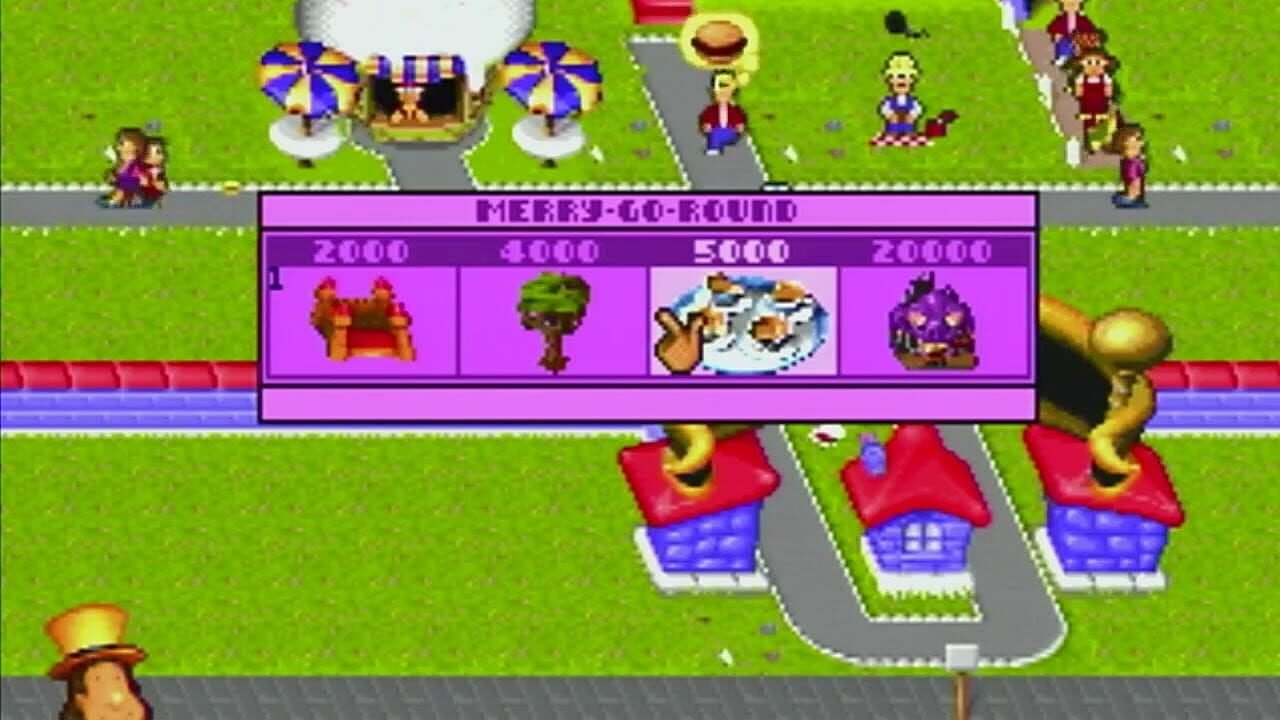
Theme Park – screenshot 3

From today's perspective it looks sober and the controls take some getting used to, but that core mechanism is still a blast. If you're tempted to build the park of your dreams and rake in the cash, this is a classic. You can play it right in your browser, no installation needed.

Video
Theme Park – gameplay video
Guides & FAQ
Can I play Theme Park online for free?
Yes — you can play Theme Park right here in your browser for free, with no installation and no plugins, on both desktop and mobile.
Can I download Theme Park?
Yes, Theme Park is available to download here — use the Download button on this page.
What platform does Theme Park run on?
Theme Park is a MS-DOS / PC game from 1994.
When was Theme Park released?
Theme Park was released in 1994.
What genre is Theme Park?
Theme Park falls under: Simulation, Strategy.
How do I save my progress in Theme Park?
Save inside the game itself — via its own menu, or F2/F3. And if you log in (free), your position is also stored in the cloud, so you can continue on another computer or phone.
Is it legal to play Theme Park online here?
You play it in your browser via an emulator. For how we handle abandonware and copyright, see our "Is it legal?" page.
How do I control Theme Park?
The controls are in the Controls section on this page. The keyboard is usually all you need — arrow keys to move and Ctrl, Alt or Space for actions.
Can I play Theme Park on mobile?
Yes — it runs right in your browser on phones and tablets too. Just tap Play, nothing to install.
Rate this game

No ratings yet — be the first.

Comments (0)

No comments yet. Be the first!

Gaming platform: MS-DOS / PC_
About the platform 1981–2000

For two decades MS-DOS was the main gaming platform on PCs. Games launched from the command line and used sound cards like Sound Blaster or AdLib. DOS is the home of legends such as Doom, Prince of Persia and Commander Keen.

Maker: IBM PC / Microsoft  ·  Years: 1981–2000

Here on oldgame.cz you play it right in your browser via the js-dos emulator — no install, no plugins, on desktop and mobile.

Recommended controls: These games are controlled with the keyboard (see the controls table next to the game). A USB joystick/gamepad can make some titles more comfortable, but is not required.

» More about this platform on Wikipedia

Similar games_
More Simulation games_
» Random