oldgame.cz — oude & retro games gratis online
NL
95 Bureaublad
oldgame.cz › Uncategorized ›

Gaminours - Shapes and Colors

_□✕
Venster:
Log in en sla je posities op — ga verder op een andere computer of telefoon. Gratis.
Gaminours - Shapes and Colors
Arrows move · Ctrl/Alt fire · Enter use · Enter/Space start/select · Esc menu

Usual keys for Keyboard games (rough guide):

Escmenu / pause
1
2
3
4
5
6
7
8
9
0
Tab
Q
W
E
R
T
Y
U
I
O
P
Caps
A
S
D
F
G
H
J
K
L
Enterconfirm / start
Shift
Z
X
C
V
B
N
M
Ctrl
Alt
space
Alt
↑
←
↓
→
move
L
R
Left click — action / fire
Click the game to lock the cursor

Esc = in-game menu · save F2, load F3.

Emulator: DOSBox (js-dos)

Livechat — Gaminours - Shapes and Colors

_□✕
livechat chat nu over dit spel — wees aardig

Nog geen berichten. Zeg hoi!

1989 · Uncategorized · MS-DOS / PC

Game-info_□✕

Over Gaminours - Shapes and Colors

Deze recensie is nog niet vertaald — we tonen het origineel (English).

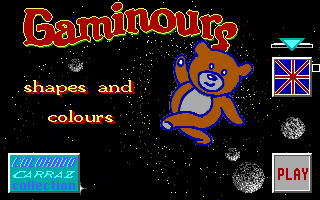
The sound I remember now isn't any melody. It's just something between bubbling and beeping—if there was anything at all. Gaminours—a name that sounds like it was made up in a rush during lunch break—is an educational game from the late eighties that practically nobody from the older generation had.

Gaminours - Shapes and Colors – screenshot 1

It's a typical DOS edutainment title aimed at kids, where you learn colors and shapes at a basic level. The game consists of examples and exercises where you have to correctly identify which color or geometric shape appears on the screen. There's no story, no motivation—just a black or dark blue background and single-color objects. Everything is built on simple interactions: you look, you recognize, you pick the right answer. As I said, nothing spectacular.

The controls are primitive in the most literal sense. Arrow keys or numbers, then either ENTER or a mouse click—if your computer even had a mouse. The graphics remind you of what it was like when a teacher brought the first computer into class in the nineties and everyone stared at the screen in silence, without much enthusiasm. Every exercise move takes forever, renders slowly, and by five minutes in you're already bored.

Gaminours belongs among those forgotten titles that exist more as a curiosity. It wasn't a groundbreaking edutainment like Reader Rabbit or Oregon Trail. It had no charm, no appeal—not even for kids back in the eighties. Over time it got swallowed up by the nameless mass of DOS software destined for schools, which nobody remembers and nobody needs to remember.

Can you play it today? Technically yes, in DOSBox or some online emulator. But why would you? It's not a game with a distinctive style or special appeal. It's just an emotionless digital workbook. Unless you're a retro game archaeologist or vaguely remember it as your lost kindergarten memory—skip it.

Veelgestelde vragen over Gaminours - Shapes and Colors

Kan ik Gaminours - Shapes and Colors gratis online spelen?
Ja — je kunt Gaminours - Shapes and Colors hier direct in je browser gratis spelen, zonder installatie en zonder plug-ins, op zowel desktop als mobiel.
Kan ik Gaminours - Shapes and Colors downloaden?
Ja, Gaminours - Shapes and Colors kun je hier downloaden — gebruik de Download-knop op deze pagina.
Op welk platform draait Gaminours - Shapes and Colors?
Gaminours - Shapes and Colors is een MS-DOS / PC-spel uit 1989.
Wanneer is Gaminours - Shapes and Colors uitgebracht?
Gaminours - Shapes and Colors is uitgebracht in 1989.
Hoe sla ik mijn voortgang op in Gaminours - Shapes and Colors?
Sla op in het spel zelf — via het menu of met F2/F3. En als je (gratis) inlogt, wordt je positie ook in de cloud bewaard, zodat je op een andere computer of telefoon verder kunt.
Is het legaal om Gaminours - Shapes and Colors hier online te spelen?
Je speelt via een emulator direct in je browser. Hoe we omgaan met abandonware en auteursrecht lees je op de pagina "Is het legaal?".
Hoe bestuur ik Gaminours - Shapes and Colors?
De besturing staat in de sectie Besturing op deze pagina. Meestal is het toetsenbord genoeg — pijltjes om te bewegen en Ctrl, Alt of spatie voor acties.
Kan ik Gaminours - Shapes and Colors op mobiel spelen?
Ja — het draait in de browser ook op telefoons en tablets. Tik op Spelen, niets te installeren.
Beoordeel dit spel

Nog geen beoordelingen — wees de eerste.

Reacties op Gaminours - Shapes and Colors

(0)

Nog geen reacties. Wees de eerste!

Gaming platform: MS-DOS / PC_□✕
About the platform 1981–2000

For two decades MS-DOS was the main gaming platform on PCs. Games launched from the command line and used sound cards like Sound Blaster or AdLib. DOS is the home of legends such as Doom, Prince of Persia and Commander Keen.

Maker: IBM PC / Microsoft  ·  Years: 1981–2000

Here on oldgame.cz you play it right in your browser via the js-dos emulator — no install, no plugins, on desktop and mobile.

Recommended controls: These games are controlled with the keyboard (see the controls table next to the game). A USB joystick/gamepad can make some titles more comfortable, but is not required.
» More about this platform on Wikipedia

Games die lijken op Gaminours - Shapes and Colors

_□✕
» Willekeurig