oldgame.cz — game lawas & retro online gratis
ID
Desktop 95
oldgame.cz › Uncategorized ›

Gaminours - Shapes and Colors

_□✕
Jendela:
Masuk dan simpan posisimu — lanjutkan di komputer atau ponsel lain. Gratis.
Gaminours - Shapes and Colors
Arrows move · Ctrl/Alt fire · Enter use · Enter/Space start/select · Esc menu

Usual keys for Keyboard games (rough guide):

Escmenu / pause
1
2
3
4
5
6
7
8
9
0
Tab
Q
W
E
R
T
Y
U
I
O
P
Caps
A
S
D
F
G
H
J
K
L
Enterconfirm / start
Shift
Z
X
C
V
B
N
M
Ctrl
Alt
space
Alt
↑
←
↓
→
move
L
R
Left click — action / fire
Click the game to lock the cursor

Esc = in-game menu · save F2, load F3.

Emulator: DOSBox (js-dos)

Obrolan langsung — Gaminours - Shapes and Colors

_□✕
obrolan langsung ngobrol tentang game ini sekarang — yang sopan ya

Belum ada pesan. Sapa duluan!

1989 · Uncategorized · MS-DOS / PC

Info game_□✕

Tentang Gaminours - Shapes and Colors

Ulasan ini belum diterjemahkan — kami menampilkan versi asli (English).

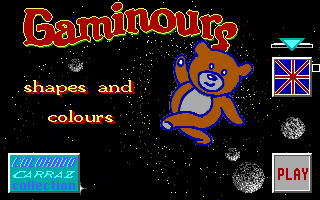
The sound I remember now isn't any melody. It's just something between bubbling and beeping—if there was anything at all. Gaminours—a name that sounds like it was made up in a rush during lunch break—is an educational game from the late eighties that practically nobody from the older generation had.

Gaminours - Shapes and Colors – screenshot 1

It's a typical DOS edutainment title aimed at kids, where you learn colors and shapes at a basic level. The game consists of examples and exercises where you have to correctly identify which color or geometric shape appears on the screen. There's no story, no motivation—just a black or dark blue background and single-color objects. Everything is built on simple interactions: you look, you recognize, you pick the right answer. As I said, nothing spectacular.

The controls are primitive in the most literal sense. Arrow keys or numbers, then either ENTER or a mouse click—if your computer even had a mouse. The graphics remind you of what it was like when a teacher brought the first computer into class in the nineties and everyone stared at the screen in silence, without much enthusiasm. Every exercise move takes forever, renders slowly, and by five minutes in you're already bored.

Gaminours belongs among those forgotten titles that exist more as a curiosity. It wasn't a groundbreaking edutainment like Reader Rabbit or Oregon Trail. It had no charm, no appeal—not even for kids back in the eighties. Over time it got swallowed up by the nameless mass of DOS software destined for schools, which nobody remembers and nobody needs to remember.

Can you play it today? Technically yes, in DOSBox or some online emulator. But why would you? It's not a game with a distinctive style or special appeal. It's just an emotionless digital workbook. Unless you're a retro game archaeologist or vaguely remember it as your lost kindergarten memory—skip it.

Pertanyaan umum tentang Gaminours - Shapes and Colors

Bisakah saya memainkan Gaminours - Shapes and Colors secara online dan gratis?
Ya — Anda bisa memainkan Gaminours - Shapes and Colors langsung di browser Anda secara gratis, tanpa instalasi dan tanpa plugin, baik di desktop maupun ponsel.
Bisakah saya mengunduh Gaminours - Shapes and Colors?
Ya, Gaminours - Shapes and Colors tersedia untuk diunduh di sini — gunakan tombol Unduh di halaman ini.
Gaminours - Shapes and Colors berjalan di platform apa?
Gaminours - Shapes and Colors adalah game MS-DOS / PC dari tahun 1989.
Kapan Gaminours - Shapes and Colors dirilis?
Gaminours - Shapes and Colors dirilis pada tahun 1989.
Bagaimana menyimpan progres di Gaminours - Shapes and Colors?
Simpan langsung di dalam game — lewat menunya atau tombol F2/F3. Jika login (gratis), posisi juga tersimpan di cloud sehingga bisa lanjut di komputer atau ponsel lain.
Apakah legal memainkan Gaminours - Shapes and Colors online di sini?
Kamu bermain lewat emulator langsung di browser. Cara kami menangani abandonware dan hak cipta dijelaskan di halaman "Apakah legal?".
Bagaimana mengendalikan Gaminours - Shapes and Colors?
Kontrol ada di bagian Kontrol pada halaman ini. Biasanya cukup keyboard — panah untuk bergerak dan Ctrl, Alt, atau spasi untuk aksi.
Bisakah main Gaminours - Shapes and Colors di ponsel?
Ya — berjalan di browser juga di ponsel dan tablet. Cukup ketuk Main, tanpa instal apa pun.
Beri nilai game ini

Belum ada penilaian — jadilah yang pertama.

Komentar tentang Gaminours - Shapes and Colors

(0)

Belum ada komentar. Jadilah yang pertama!

Gaming platform: MS-DOS / PC_□✕
About the platform 1981–2000

For two decades MS-DOS was the main gaming platform on PCs. Games launched from the command line and used sound cards like Sound Blaster or AdLib. DOS is the home of legends such as Doom, Prince of Persia and Commander Keen.

Maker: IBM PC / Microsoft  ·  Years: 1981–2000

Here on oldgame.cz you play it right in your browser via the js-dos emulator — no install, no plugins, on desktop and mobile.

Recommended controls: These games are controlled with the keyboard (see the controls table next to the game). A USB joystick/gamepad can make some titles more comfortable, but is not required.
» More about this platform on Wikipedia

Game yang mirip dengan Gaminours - Shapes and Colors

_□✕
» Acak