oldgame.cz — เกมเก่าและเรโทรออนไลน์ฟรี
ไทย
เดสก์ท็อป 95
oldgame.czปริศนา

The Backyard

_
หน้าต่าง:
The Backyard
Enter/Space start/select · Esc menu

Usual keys for Strategy games (rough guide):

1
2
3
4
5
6
7
8
9
0
Tab
Q
W
E
R
T
Y
U
I
O
P
Caps
A
S
D
F
G
H
J
K
L
Enter
Shift
Z
X
C
V
B
N
M
Ctrl
Alt
space
Alt
move
L
R
Click the game to lock the cursor

Esc = in-game menu · save F2, load F3.

Emulator: DOSBox (js-dos)

แชทสด — The Backyard_
แชทสด คุยเรื่องเกมนี้แบบเรียลไทม์ — สุภาพหน่อยนะ

ยังไม่มีข้อความ ทักทายก่อนเลย!

1993 · ปริศนา, กลยุทธ์ · MS-DOS / PC

ข้อมูลเกม_
เกี่ยวกับเกม

รีวิวนี้ยังไม่ได้แปล — แสดงต้นฉบับ (English)

Sometimes all you need is a sandbox, a few toys, and some free time. The Backyard is exactly that kind of logic game — it doesn't set its sights too high. It just gives you a task and waits to see if you can pull it off without someone looking over your shoulder.
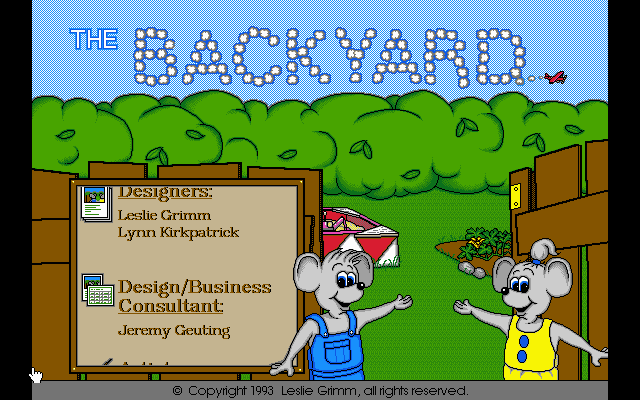
The Backyard – screenshot 1

It's a logic puzzle for MS-DOS computers where you move around a simple yard map, collecting and shifting objects around. The goal is to reach a certain state — put things in the right places, connect elements, sometimes solve a riddle. The game has no story pulling you forward. It's pure brain-teaser with no unnecessary frills. The nineties, when time was precious.

The controls are straightforward — movement on screen and interaction with the environment using a few keys or the mouse. Nothing complex, but that's sometimes the problem. When the game doesn't hint at what you should do, or the line between the right and wrong solution isn't clear, it can get frustrating. Some levels are elegant, others feel like guessing what the creator had in mind. It doesn't lack pace — it's more meditative than adrenaline-fueled.

The Backyard didn't bring revolution. It wasn't a hit that the masses would remember. But for people who were into logic back then and enjoyed solving problems at a leisurely pace without time pressure, it had its charm. Today it's aged precisely because it lacks visual or audio wit — it's plain and functional, nothing more.

When you fire it up in a browser or on DOSBox these days, don't expect graphics. Don't expect a tune that'll be stuck in your head either. It comes down to whether you enjoy wracking your brain over moving things to the right spot. If you do, it still hits the mark. If you don't, it's going to be a long road to the finish.

Video
The Backyard – gameplay video
ไกด์และ FAQ
เล่น The Backyard ออนไลน์ฟรีได้ไหม?
ได้ — คุณสามารถเล่น The Backyard ได้ที่นี่เลยในเบราว์เซอร์ของคุณ ฟรี ไม่ต้องติดตั้ง ไม่ต้องใช้ปลั๊กอิน ทั้งบนเดสก์ท็อปและมือถือ
ดาวน์โหลด The Backyard ได้ไหม?
ได้ The Backyard พร้อมให้ดาวน์โหลดที่นี่ — ใช้ปุ่มดาวน์โหลดบนหน้านี้
The Backyard ทำงานบนแพลตฟอร์มใด?
The Backyard เป็นเกม MS-DOS / PC จากปี 1993
The Backyard วางจำหน่ายเมื่อใด?
The Backyard วางจำหน่ายในปี 1993
The Backyard เป็นเกมแนวใด?
The Backyard จัดอยู่ในหมวด: Logic, Strategy
บันทึกความคืบหน้าใน The Backyard อย่างไร?
เซฟในตัวเกมผ่านเมนูของเกมหรือปุ่ม F2/F3 และถ้าล็อกอิน (ฟรี) ตำแหน่งจะถูกเก็บบนคลาวด์ด้วย เล่นต่อบนคอมหรือมือถือเครื่องอื่นได้
เล่น The Backyard ออนไลน์ที่นี่ถูกกฎหมายไหม?
คุณเล่นผ่านอีมูเลเตอร์ในเบราว์เซอร์ วิธีที่เราจัดการ abandonware และลิขสิทธิ์อธิบายไว้ในหน้า "ถูกกฎหมายไหม?"
บังคับ The Backyard อย่างไร?
วิธีบังคับอยู่ในส่วน "การบังคับ" ของหน้านี้ ปกติใช้แค่คีย์บอร์ด — ลูกศรเดิน และ Ctrl, Alt หรือสเปซบาร์สำหรับแอ็กชัน
เล่น The Backyard บนมือถือได้ไหม?
ได้ — เล่นในเบราว์เซอร์บนมือถือและแท็บเล็ตได้ แค่แตะ "เล่น" ไม่ต้องติดตั้งอะไร
ให้คะแนนเกมนี้

ยังไม่มีคะแนน — เป็นคนแรก

ความคิดเห็น (0)

ยังไม่มีความคิดเห็น เป็นคนแรกสิ!

Gaming platform: MS-DOS / PC_
About the platform 1981–2000

For two decades MS-DOS was the main gaming platform on PCs. Games launched from the command line and used sound cards like Sound Blaster or AdLib. DOS is the home of legends such as Doom, Prince of Persia and Commander Keen.

Maker: IBM PC / Microsoft  ·  Years: 1981–2000

Here on oldgame.cz you play it right in your browser via the js-dos emulator — no install, no plugins, on desktop and mobile.

Recommended controls: These games are controlled with the keyboard (see the controls table next to the game). A USB joystick/gamepad can make some titles more comfortable, but is not required.

» More about this platform on Wikipedia

เกมที่คล้ายกัน_
เกมปริศนาเพิ่มเติม_
» สุ่ม