oldgame.cz — mga luma at retro na laro online nang libre
TL
95 Desktop

Loco

– Commodore 64
Loco
KontrolMga arrow galaw · Z X A S mga button · Enter Start · Shift Select · o magkabit ng gamepadCommodore 64

1984 · Aksyon · Antony Crowther · Commodore 64

Impormasyon ng laro_□✕

Tungkol sa Loco

Hindi pa naisasalin ang review na ito — ipinapakita ang orihinal (English).

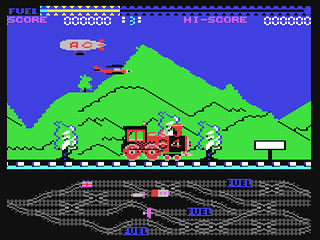
You're piloting a train through what looks like a fever dream drawn on graph paper. Loco, Antony Crowther's 1984 effort for the Commodore 64, strips locomotion down to its skeleton—you steer left and right, collect cargo, and try not to derail into the scenery. It's as simple as a game gets, and that simplicity is both its charm and its curse.

Loco – screenshot 1

The concept is straightforward: your blocky train winds through increasingly twisted tracks, and you need to grab glowing pickups while avoiding obstacles. There's no story to speak of, no explanation why you're doing this. Alligata Software just wound you up and let you go. The Commodore 64's chunky pixel palette does the heavy lifting—everything looks like it was assembled from construction toys, which somehow works in the game's favor. It feels intentional rather than primitive.

Mechanically, Loco is all about timing and rhythm. The train moves in a fixed pattern, and your only real control is steering it slightly off course to snag items or dodge hazards. It sounds tense on paper, but the execution feels sluggish. There's a delay between your input and the train's response, which can feel natural for something as heavy as, well, a train, but it makes the game frustrating rather than challenging. You're reactive, not in control. After a few rounds, you've learned the patterns, and it stops being a puzzle and starts being a chore.

What lingers is the aesthetic. This is mid-80s British budget gaming at its most unpolished—rough around the edges, no hand-holding, no tutorial, just "here's a train, now what?" It has personality precisely because nobody worried about mass appeal. Crowther's work for the 8-bit scene was prolific but often forgettable; Loco sits somewhere in the middle—competent but forgettable.

Today, Loco works as a time capsule. It's the kind of game you boot up in a browser, play for five minutes, and understand exactly what a Tuesday afternoon in 1984 felt like for kids with £3 to spend. Not every game needs to be rediscovered as a hidden gem. Sometimes they're just what they are: a modest, dated curiosity that taught us nothing except that not everything from the past was gold.

Mga video at gabay

Mga madalas itanong tungkol sa Loco

Puwede ko bang laruin ang Loco online nang libre?
Oo — puwede mong laruin ang Loco dito mismo sa iyong browser nang libre, nang walang pag-install at walang plugin, sa desktop man o sa mobile.
Puwede ko bang i-download ang Loco?
Oo, puwedeng i-download ang Loco dito — gamitin ang Download button sa pahinang ito.
Sa anong platform tumatakbo ang Loco?
Ang Loco ay isang larong Commodore 64 mula noong 1984.
Kailan inilabas ang Loco?
Ang Loco ay inilabas noong 1984.
Sino ang gumawa ng Loco?
Ang Loco ay binuo ng Antony Crowther.
Anong genre ang Loco?
Ang Loco ay nabibilang sa: Action.
Legal bang laruin ang Loco online dito?
Naglalaro ka gamit ang emulator mismo sa browser. Kung paano namin hinahawakan ang abandonware at copyright, nasa pahinang "Legal ba ito?".
Paano kontrolin ang Loco?
Nasa seksyong Kontrol ng pahinang ito ang mga kontrol. Kadalasan sapat na ang keyboard — arrow keys para gumalaw at Ctrl, Alt o Space para sa aksyon.
Puwede bang laruin ang Loco sa mobile?
Oo — tumatakbo ito sa browser kahit sa phone at tablet. I-tap lang ang Maglaro, walang ii-install.

Mga komento sa Loco

(0)

Wala pang komento. Ikaw ang mauna!

Gaming platform – Commodore 64_□✕
About the platform 1982–1994

The Commodore 64 is the best-selling home computer of all time (over 17 million units). Its SID sound chip became iconic and chiptune music is still composed for it today.

Maker: Commodore  ·  Years: 1982–1994

Here on oldgame.cz you play it right in your browser via the EmulatorJS emulator — no install, no plugins, on desktop and mobile.

Recommended controls: These games are controlled with the keyboard (see the controls table next to the game). A USB joystick/gamepad can make some titles more comfortable, but is not required.

» More about this platform on Wikipedia

Mga larong katulad ng Loco

_□✕

Higit pang Aksyon na laro

_□✕
» Random
🚪 Klasikong site