oldgame.cz — पुराने और रेट्रो गेम मुफ़्त ऑनलाइन
हिन्दी
95 डेस्कटॉप
oldgame.czUncategorized

Learn to Add

_
विंडो:
लॉगिन करें और पोज़िशन सेव करें — दूसरे कंप्यूटर या फोन पर जारी रखें। मुफ़्त।
Learn to Add
Arrows move · Ctrl/Alt fire · Enter use · Enter/Space start/select · Esc menu

Usual keys for Keyboard games (rough guide):

Escmenu / pause
1
2
3
4
5
6
7
8
9
0
Tab
Q
W
E
R
T
Y
U
I
O
P
Caps
A
S
D
F
G
H
J
K
L
Enterconfirm / start
Shift
Z
X
C
V
B
N
M
Ctrl
Alt
space
Alt
move
L
R
Left click — action / fire
Click the game to lock the cursor

Esc = in-game menu · save F2, load F3.

Emulator: DOSBox (js-dos)

लाइव चैट — Learn to Add_
लाइव चैट इस गेम पर अभी चैट करें — विनम्र रहें

अभी कोई संदेश नहीं। पहले लिखें!

1984 · Uncategorized · Childware · MS-DOS / PC

गेम जानकारी_
गेम के बारे में

यह समीक्षा अभी अनूदित नहीं है — मूल संस्करण (English) दिखाया जा रहा है।

1984. PCs looked like gray brick cabinets with blinking cursors, and educational software for kids typically meant a black screen with text and maybe a single beep for a correct answer. Against this backdrop, Childware released Learn to Add — a game that at least tried to make arithmetic into something more than drill work.
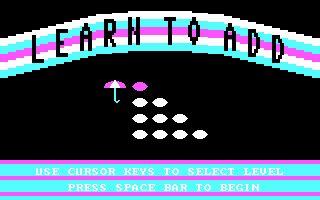
Learn to Add – screenshot 1

The goal is straightforward: teach preschoolers to add numbers up to nine. No plot, no villains. Instead, animals, a rainbow, and simple math problems as visual rewards for correct answers. The game offers four difficulty levels, switched by moving a little umbrella — a detail that feels rather charming. A child from 1984 could choose where to start on their own, without needing to read instructions written in adult-sized letters.

The game loop is as simple as it gets: an example appears, the player enters the result, the game responds. A correct answer helps build a rainbow or move an animal — the exact details of the animations are hard to describe precisely today, but visual feedback was above standard for an educational title of that era. Keyboard controls posed no obstacles, which was a sensible choice for an audience around four to six years old.
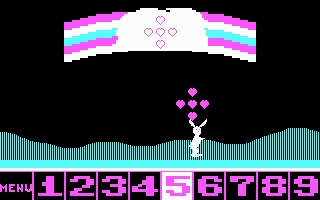
Learn to Add – screenshot 2

What you feel strongly today is those forty years of age. The graphics are sparse even by 1984 standards, and the sound corresponds to the most basic things a PC speaker could produce. But judging Learn to Add by 2024 aesthetic standards is about as fair as criticizing a calculator for not streaming. This title never wanted to be entertainment for parents sitting behind a child — it simply, without unnecessary fuss, wanted to teach small hands and small minds that two and three make five.
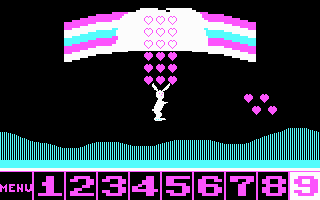
Learn to Add – screenshot 3

Today, essentially only those who experienced DOS in childhood will play it, wanting to briefly feel what "educational software" looked like back then. As a tool for today's preschoolers, it stands no chance competing with anything on a tablet. As a historical artifact, though, it has a quiet charm — a reminder of an era when a rainbow made of eight pixels was enough, and a child had reason to press the right number.

गाइड और FAQ
क्या मैं Learn to Add को मुफ़्त में ऑनलाइन खेल सकता हूँ?
हाँ — आप Learn to Add को यहीं अपने ब्राउज़र में मुफ़्त में खेल सकते हैं, बिना किसी इंस्टॉलेशन और बिना किसी प्लगइन के, डेस्कटॉप और मोबाइल दोनों पर।
क्या मैं Learn to Add को डाउनलोड कर सकता हूँ?
हाँ, Learn to Add यहाँ डाउनलोड के लिए उपलब्ध है — इस पेज पर दिए गए डाउनलोड बटन का उपयोग करें।
Learn to Add किस प्लेटफ़ॉर्म पर चलता है?
Learn to Add 1984 का एक MS-DOS / PC गेम है।
Learn to Add कब रिलीज़ हुआ था?
Learn to Add 1984 में रिलीज़ हुआ था।
Learn to Add को किसने बनाया?
Learn to Add को Childware ने विकसित किया था।
Learn to Add में प्रगति कैसे सेव करें?
गेम के अपने मेनू या F2/F3 से सेव करें। लॉगिन (मुफ़्त) करने पर पोज़िशन क्लाउड में भी सेव होती है — दूसरे कंप्यूटर या फोन पर जारी रखें।
क्या यहाँ Learn to Add ऑनलाइन खेलना कानूनी है?
आप ब्राउज़र में एमुलेटर से खेलते हैं। एबंडनवेयर और कॉपीराइट पर हमारा रुख "क्या यह कानूनी है?" पेज पर है।
Learn to Add को कैसे कंट्रोल करें?
कंट्रोल इस पेज के कंट्रोल सेक्शन में हैं। आमतौर पर कीबोर्ड काफ़ी है — तीर कुंजियों से चलें और Ctrl, Alt या स्पेस से एक्शन।
क्या Learn to Add मोबाइल पर खेल सकते हैं?
हाँ — यह फोन और टैबलेट के ब्राउज़र में भी चलता है। बस Play दबाएँ, कुछ इंस्टॉल नहीं करना।
Rate this game

No ratings yet — be the first.

कमेंट (0)

अभी कोई कमेंट नहीं। पहले बनें!

Gaming platform: MS-DOS / PC_
About the platform 1981–2000

For two decades MS-DOS was the main gaming platform on PCs. Games launched from the command line and used sound cards like Sound Blaster or AdLib. DOS is the home of legends such as Doom, Prince of Persia and Commander Keen.

Maker: IBM PC / Microsoft  ·  Years: 1981–2000

Here on oldgame.cz you play it right in your browser via the js-dos emulator — no install, no plugins, on desktop and mobile.

Recommended controls: These games are controlled with the keyboard (see the controls table next to the game). A USB joystick/gamepad can make some titles more comfortable, but is not required.

» More about this platform on Wikipedia

मिलते-जुलते गेम_
» यादृच्छिक