oldgame.cz — old & retro games online free
EN
95 Desktop

Silverball

– MS-DOS
Silverball
ControlsEnter/Space start/selectEsc menuMS-DOS

1993 · Action · Digital Extremes · MS-DOS / PC

Game info_□✕

About Silverball

I remember trying to convince my dad that we didn't need a new computer for work — but for pinball. Silverball by Digital Extremes from 1993 was exactly the argument that might have worked if he'd seen it in action.
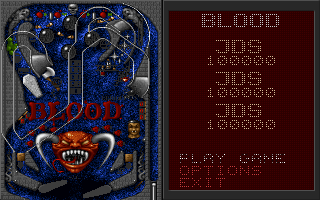
Silverball – screenshot 1

It's virtual pinball. No story, no missions, no saving the world — just a ball, a tilted table, and the drive to beat your own high score. Digital Extremes, a studio that would later become something entirely different, bet on a genre that was still finding its place on PC. Silverball came as a follow-up to their previous attempt and had a clear goal: to give players the feeling of sitting at a real arcade machine.

And it mostly succeeded. The ball physics felt credible for the time — not perfect, but enough that your brain accepted the illusion. The tables offered ramps, various targets, and bonus systems with more layers than was typical on PC back then. Sounds from the Sound Blaster did what they could and did it well — impacts, clicks, electronic fanfares. One neat feature was the ability to adjust graphics quality right in the menu, because CPUs back then didn't have spare processing power and the developers knew it. This pragmatic choice to balance speed versus detail was unusual for 1993 and honestly practical.
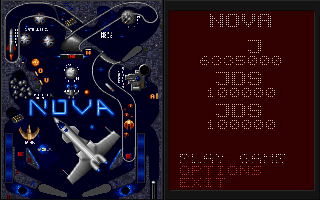
Silverball – screenshot 2

What aged less well? The number of tables was limited, and after a while came that specific fatigue where you know every bounce from memory. Virtual pinball in general struggles with what a physical machine has naturally — weight, vibration, that slight table tilt under your hands. Silverball was good, but never quite crossed the line between simulation and substitute. Today, after years of playing Zen Pinball or Pro Pinball, you can feel it.
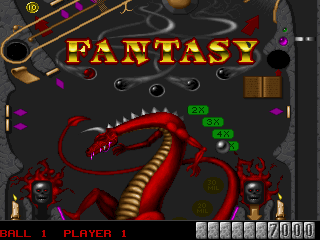
Silverball – screenshot 3

Who should play Silverball today? Mainly those who want to know what virtual pinball looked like before it became a high-res affair with physics engines. It's honest software from a time when every megahertz counted. You can fire it up in your browser via DOSBox Online in five minutes — and in another five you'll know whether this slice of '90s gaming portfolio means anything to you or not.

Videos and guides

Silverball FAQ

Can I play Silverball online for free?
Yes — you can play Silverball right here in your browser for free, with no installation and no plugins, on both desktop and mobile.
Can I download Silverball?
Yes, Silverball is available to download here — use the Download button on this page.
What platform does Silverball run on?
Silverball is a MS-DOS / PC game from 1993.
When was Silverball released?
Silverball was released in 1993.
Who made Silverball?
Silverball was developed by Digital Extremes.
What genre is Silverball?
Silverball falls under: Action.
How do I save my progress in Silverball?
Save inside the game itself — via its own menu, or F2/F3. And if you log in (free), your position is also stored in the cloud, so you can continue on another computer or phone.
Is it legal to play Silverball online here?
You play it in your browser via an emulator. For how we handle abandonware and copyright, see our "Is it legal?" page.
How do I control Silverball?
The controls are in the Controls section on this page. The keyboard is usually all you need — arrow keys to move and Ctrl, Alt or Space for actions.
Can I play Silverball on mobile?
Yes — it runs right in your browser on phones and tablets too. Just tap Play, nothing to install.

Comments on Silverball

(0)

No comments yet. Be the first!

Gaming platform – MS-DOS / PC_□✕
About the platform 1981–2000

For two decades MS-DOS was the main gaming platform on PCs. Games launched from the command line and used sound cards like Sound Blaster or AdLib. DOS is the home of legends such as Doom, Prince of Persia and Commander Keen.

Maker IBM PC / Microsoft  ·  Years 1981–2000

Here on oldgame.cz you play it right in your browser via the js-dos emulator — no install, no plugins, on desktop and mobile.

Recommended controls
These games are controlled with the keyboard (see the controls table next to the game). A USB joystick/gamepad can make some titles more comfortable, but is not required.

» More about this platform on Wikipedia

Games similar to Silverball

_□✕

More Action games

_□✕
» Random
🚪 Classic site